


Invoice2go: Easy Invoice Maker
4.55.66K Reviews
App Specs
- Version
- 11.167.0
- Updated On
- License
- Free
- Downloads
- 1,000,000+
- Developer
- Invoice2Go
- Categories
- Business
- Platform
- Android, iOS
Screenshots
 Analysis by AppCompare
For a small household business, the hard part is often not making a sale but keeping the paperwork from spilling into family time. I like that Invoice2go: Easy Invoice Maker is built around the practical loop of preparing invoices, following payments and reviewing business activity. It suits a person who handles jobs themselves and wants to keep that routine close at hand, rather than building a complicated accounting setup before it is needed.
One phone, one business identity
A shared phone or tablet can make business admin convenient, but it also makes clear account boundaries important. I’d treat the app as the business owner’s workspace, not as a general household tool: use the account for the person responsible for issuing invoices, and avoid passing around access casually. That keeps client details and payment follow-up from becoming mixed up with someone else’s errands or personal activity.
For example, a self-employed cleaner might finish a job while a partner is using the family tablet. The simplest routine is for the business owner to prepare or check the invoice in their own session, then tell the partner what needs attention instead of sharing credentials. The app can support the invoicing task; it should not be treated as a substitute for deciding who is allowed to see client information or make changes.
Setting it up around real work
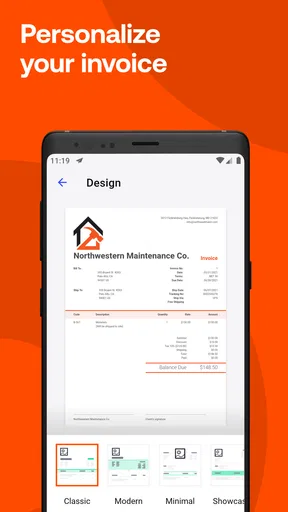
I would start with one ordinary invoice and test the details before using a template for every customer. A logo and consistent colors can make documents look more polished, but the practical check is whether the description, amount and payment instructions are easy for a client to understand. A saved visual style is useful only if the underlying information is accurate.
That first invoice is also a good moment to decide how much of the workflow belongs on a phone. A quick draft after a job can prevent forgotten details, while a longer review may be more comfortable on another device if that is part of your routine. I would not assume every household member needs access just because the app can be used across devices; coordination can happen through a shared task list or conversation without giving everyone control of the business account.
Keeping coordination from becoming clutter
When two people help run a small operation, the useful question is who owns each step: who records the job, who checks that the invoice went out, and who follows up if payment is late. Automated reminders may reduce the need to remember every due date, but I would still agree on who monitors replies and records any arrangement made directly with a client. Otherwise, a reminder can be sent at the wrong moment or a payment conversation can be missed.
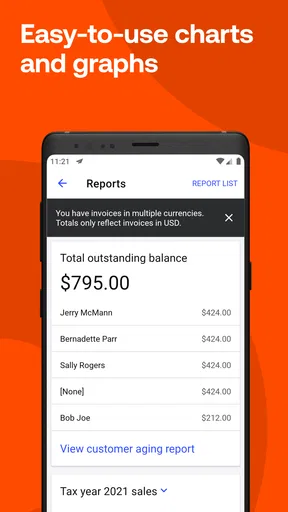
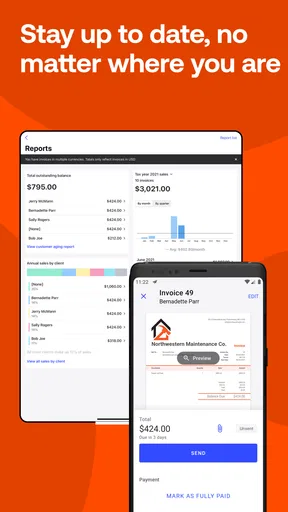
Reports can also help turn a household discussion into a more grounded one. Instead of guessing whether a busy month was a profitable month, the person managing the business can review the information available in the app and use it as a starting point for planning. I would keep that review separate from a casual glance by another family member: financial summaries deserve the same care as invoices with customer details.
Worth Reading Before You Choose

EA SPORTS FC Mobile 26 Is a Bigger Football Game, but It Takes Time

Flipboard Shows What News Apps Must Do Beyond the Feed

Switching to Android Auto Means Rethinking Your Driving Routine

Google Calendar Makes a Crowded Week Easier to Manage

Ludo King Makes the Most of the Minutes Between Plans

Baby Panda World Brings Quick Play to Modern Phones, but Its Game Library Feels Busy
Age, trust and who should use it
The app is rated for Everyone, but that content label is not a recommendation for children to manage a business account. In my view, the right user is an adult or responsible business owner who understands what an invoice commits them to and can handle customer and payment information carefully. A younger family member might help with a supervised task, such as checking that a job description is complete, without being given unrestricted access.
Invoice2go is most appealing when one person or a small team needs a straightforward way to create invoices and keep an eye on outstanding payments. If your household mainly wants to split personal expenses, track a shared grocery budget or coordinate chores, this is the wrong kind of app. Its business focus is a strength for client work, but it does not turn household coordination into business accounting.
It is free to download, and optional in-app purchases range from under a dollar to several hundred dollars per item. I’d check the plan and purchase details in the app before building a long-term routine around it, especially if the business is just starting out. A free download does not necessarily mean every feature or ongoing use is included at no cost, so compare the actual terms with how often you invoice.
Invoice2go is a business app from Invoice2Go, with an average rating of 4.6 from around 31,000 ratings and more than a million installs. It was released in 2012, and version 11.167.0 is listed for devices running Android 7.0 or later. Those figures suggest it has a substantial user base, but I’d still judge it by whether its workflow matches your business rather than by popularity alone.
My household verdict is simple: keep the account under the business owner’s control, decide together who handles each follow-up, and use the app for client-facing work rather than shared domestic admin. That approach makes its convenience more useful without blurring privacy or responsibility.
Ever find yourself drowning in a sea of paperwork with invoices piling up faster than you can say "business expense"? Well, let me introduce you to a little lifesaver I stumbled upon called Invoice2go: Easy Invoice Maker. This nifty app has been my go-to for handling invoices with the ease of a pro.
First Impressions
When I first downloaded Invoice2go, I was immediately struck by its clean and user-friendly interface. You don’t need a degree in accounting to navigate this app, which is a huge relief for someone like me who tends to break out in hives at the sight of spreadsheets. It’s intuitive, and setting it up was a breeze—just a few taps and I was ready to start invoicing.
Features Galore
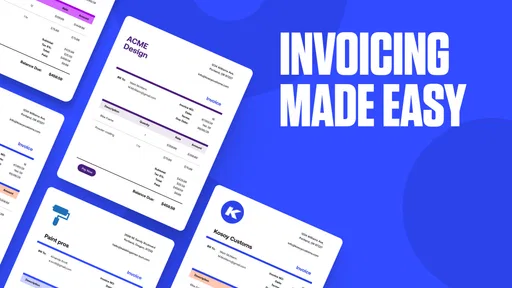
Now, let's dive into what makes this app a standout. Customizable templates are probably my favorite feature. Whether you're invoicing for freelance work, a small business, or side gigs, you can tailor your invoices to reflect your brand. You can add your logo, choose colors, and even include personalized messages. It’s all about making that professional impression.
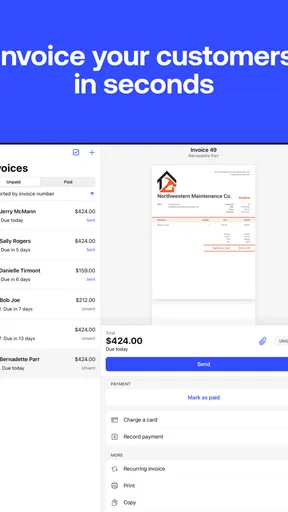
Automated reminders are another game-changer. You no longer have to awkwardly chase clients for payments. The app sends gentle nudges their way, which is a godsend for maintaining good client relationships. Plus, it helps you stay on top of things by tracking who’s paid and who’s still got an outstanding balance.
Getting into the Nitty-Gritty
One of the things that really impressed me about Invoice2go is its ability to generate reports. With just a tap, you can see all your financial data laid out in a way that actually makes sense. This has been super helpful for tax season and just keeping tabs on my cash flow in general. It’s detailed yet digestible—just the way I like it.
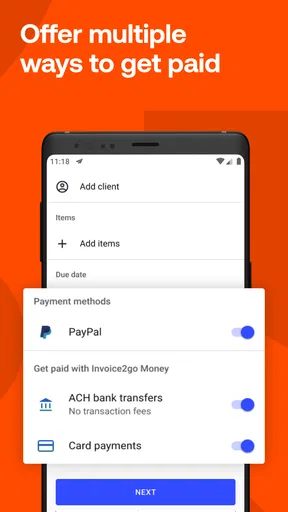
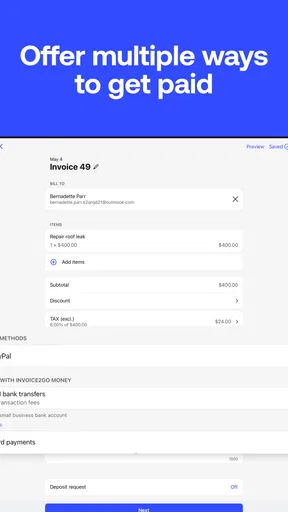
Payment options are another highlight. Clients can pay directly through the invoice using various methods, including credit cards and PayPal. This flexibility not only speeds up the payment process but also makes it more convenient for everyone involved.
The Mobile Advantage
What’s great about Invoice2go is its mobile compatibility. Whether you’re stuck in traffic or lounging on the beach, you can manage your invoices on the go. The app syncs seamlessly across devices too, which means you can start an invoice on your phone and finish it on your tablet or laptop. It’s all about convenience and efficiency.
Room for Improvement?
No app is perfect, and while I’m a big fan of Invoice2go, it’s worth noting that some users might find the subscription model a bit on the pricey side. However, considering the time and hassle it saves, I personally think it’s worth the investment. As they say, time is money!
Another area that could use a bit of finessing is the customer support. While I haven’t had major issues, there were a couple of times I wished for quicker responses. It’s nothing deal-breaking but something to keep in mind.
Final Thoughts
All in all, Invoice2go has been a game-changer for me. It’s taken the stress out of invoicing and given me more time to focus on what I actually love doing. Whether you’re a solo freelancer or running a small business, this app is definitely worth checking out. It’s like having an accountant in your pocket—minus the hefty fees.
So, if you’re tired of wrestling with invoices and want a streamlined, professional solution, give Invoice2go a whirl. Who knows, it might just become your new best business buddy.
A practical end-of-day workflow
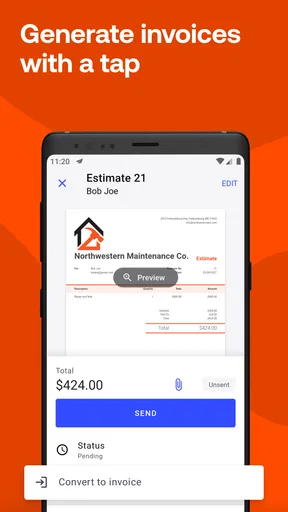
Imagine a freelance photographer wrapping up a small shoot late in the afternoon. Rather than relying on memory the next morning, they can draft the invoice while the job details are still fresh, use a consistent template, and check that the client-facing message sounds natural. Later, the payment tracker gives them a quick way to see which jobs still need attention. That is where this kind of app earns its place: it connects the work completed today with the money that still needs to arrive.
I’d avoid treating a reminder as a replacement for judgment. If a client has already explained that payment is being processed, a generic nudge may feel impersonal. A sensible habit is to review the outstanding balance before following up, then decide whether an automated reminder or a personal note is more appropriate. This small check preserves the time-saving benefit without making the business sound robotic.
Where it fits among invoicing options
Compared with a spreadsheet and a document template, Invoice2go can make repeat work less fiddly: the visual format stays consistent, payment status is easier to scan, and reporting is closer to the invoicing workflow. A spreadsheet may still be better if you need a highly customized ledger or want to control every calculation yourself. Likewise, a broader accounting package is often the stronger choice when invoicing is only one part of a more involved bookkeeping process.
That distinction matters for a growing business. If you mainly need to send polished invoices, collect payments and get a readable view of activity, a focused invoicing app can feel lighter than adopting a full accounting system. If you need detailed bookkeeping procedures or a workflow shaped around several roles, I’d compare options carefully rather than assuming that a mobile-first invoice tool will cover every financial task.
Small habits that make it more useful
One useful habit is to settle on a naming and description style before sending invoices regularly. Clear, consistent line descriptions make it easier for clients to understand what they are paying for, and they make later reports more meaningful to you. Another is to review the payment status at a set point in your week rather than checking it whenever a notification catches your attention. That turns a stream of small interruptions into one deliberate admin task.
For recurring kinds of work, I’d also keep the template professional but not overly decorative. A logo and color choices can establish recognition, yet a client should be able to locate the amount due and payment details immediately. The best customization is not the most elaborate one; it is the version that makes the invoice feel like yours while keeping the important information obvious.
Questions worth settling before relying on it
Can a client pay without a long back-and-forth? The app’s invoice payment options are intended to make that step more direct, though the methods a client can use depend on what is available for the transaction. I’d make the payment instructions clear on the first invoice and ask a regular client whether the process is convenient before making it the only route you offer.
Can it replace an accountant or a complete bookkeeping system? I wouldn’t rely on it for that. Reports can help me review business activity and cash flow, but an invoice tool is not automatically a substitute for tax advice or a full accounting process. For a straightforward solo operation it can reduce admin; for complicated finances, I’d use appropriate accounting support alongside it.
Is it suitable for someone who sends only a few invoices? Possibly, but the value depends on whether the time saved and payment tracking matter enough to justify any paid plan they choose. If you send invoices rarely and already have a dependable template, a basic document and a simple tracking sheet may be all you need. If follow-ups regularly slip through the cracks, the app’s organized workflow becomes more compelling.
Who should look elsewhere
I would skip it if your priority is household budgeting, shared shopping, or splitting personal bills; those tasks need tools designed around personal money rather than client invoices. I’d also look elsewhere if you want one system to handle a demanding accounting workflow, or if you dislike subscription-based services and the available purchase terms do not suit your budget. The fact that it is easy to start using does not mean it is the right fit for every kind of business.
For me, the strongest case is a freelancer, tradesperson or small service business that needs to make a professional invoice soon after finishing work and then remember what remains unpaid. The weaker case is someone who wants extensive accounting controls, a household finance hub, or only occasional document creation. Choosing based on that difference is more useful than choosing based on a polished template alone.
Final household verdict
I’d recommend Invoice2go to a self-employed person who wants invoicing and payment follow-up to feel less scattered, especially when jobs happen away from a desk. Keep the business account with the person responsible for it, coordinate household help without sharing access by default, and check the plan before making it central to your routine. Used within those boundaries, it can be a practical business companion; used as a general family organizer or assumed to be a complete accounting solution, it is the wrong tool.
Pros
- User-friendly interface for quick setup.
- Customizable invoice templates available.
- Supports multiple currencies and languages.
- Real-time notifications for invoice status.
- Integration with popular payment gateways.
Cons
- Limited free version features.
- Occasional sync issues reported.
- No offline mode for invoice creation.
- Higher tiers can be expensive.
- Complex reports for beginners.
FAQs for Invoice2go: Easy Invoice Maker
What features does Invoice2go offer for creating invoices?
Invoice2go provides a variety of features to streamline the invoicing process. Users can create custom invoices with their own branding, logos, and color schemes. The app also supports automatic calculations, recurring invoices, and multiple currency options. Additionally, it offers templates for estimates, purchase orders, and receipts, making billing efficient and professional.
Is Invoice2go suitable for small businesses and freelancers?
Yes, Invoice2go is designed specifically for small businesses and freelancers. Its user-friendly interface and customizable templates cater to those who need a straightforward solution for billing clients. The app's ability to manage expenses, track time, and generate reports makes it an ideal choice for entrepreneurs looking to keep their finances organized.
Can I integrate Invoice2go with other tools or platforms?
Invoice2go offers integration with several popular platforms to enhance productivity. You can connect it with accounting software like QuickBooks, payment processors such as PayPal and Stripe, and even cloud storage services like Google Drive. These integrations help streamline your workflow by syncing data across different tools.
How secure is my data on Invoice2go?
Invoice2go prioritizes data security to ensure your information is protected. It uses encryption to safeguard data during transmission and storage. Regular backups and security updates are performed to prevent data loss and unauthorized access. Users can rest assured that their financial data is handled with the utmost care and privacy.
Does Invoice2go support mobile access?
Absolutely, Invoice2go offers robust mobile apps for both Android and iOS devices. This allows users to create and send invoices on the go, manage client information, and track payments from anywhere. The mobile app syncs seamlessly with the desktop version, ensuring all invoicing tasks can be performed efficiently, regardless of location.


